
 Global
Infomation Update: Impact of Microsoft basic authentication deprecation in Exchange Online and support for affected Ricoh products
Ricoh has been made aware of Microsoft's decision to phase out support for basic authentication for sending emails using the SMTP protocol in Exchange Online after the end of December 2026*. Following this change, OAuth2.0 authentication will be required on applications and devices when using the SMTP protocol to send emails.
-
*On January 27, 2026, Microsoft updated the timeline of the depreciation which was previously March 2026
For more details on the phased deprecation schedule, please refer to Microsoft's official link below.
 Updated Exchange Online SMTP AUTH Basic Authentication Deprecation Timeline
This notice explains which Ricoh product functions are affected by the deprecation and the planned schedule for OAuth2.0 authentication support.
Update on Ricoh’s response (changes from previous version dated October 28, 2025)
Microsoft has announced that the TLS cipher suites supported by Microsoft 365 will be updated to enhance encryption standards. As a result, some Ricoh products—including models that already support OAuth 2.0 authentication—will no longer be able to send or receive emails via Exchange Online. For details, please refer to the following.

1. Affected functions
After basic authentication is discontinued, an error will occur when sending emails using the following functions:
- Sending email using the scan function
- Sending internet fax
- Sending fax to an email address
- On-demand Email Notification (function that notifies machine status by email)
- Auto Email Notification (function that sends error notification to a designated administrator email address)
- Sending error notification when using Mail to Print
2. Ricoh's response to this change
Firmware supporting OAuth2.0 authentication will be made available starting July 2025. Please refer to section 3, “Supported models and OAuth2.0 authentication firmware schedule” for details.
If your device does not support automatic firmware updates or if automatic firmware updates is not enabled, then updates must be applied manually using the RICOH Firmware Update Tool.
After the firmware is updated, you will also need to configure the authentication settings from Web Image Monitor. For detailed instructions, please refer to the document “Guide to set up OAuth2.0 authentication for sending Microsoft Exchange Online email” below.
Please note that the applicable guideline varies by product list. Refer to section 3, “Supported models and OAuth2.0 authentication firmware schedule” to confirm which list your device is included in and follow the corresponding guideline.
For products in Table 1:
 Guide to set up OAuth 2.0 authentication for sending Microsoft Exchange Online email
For products in Table 2:
Guide to set up OAuth 2.0 authentication for sending Microsoft Exchange Online email
Until firmware for OAuth2.0 authentication is available for your product, we recommend switching to methods that do not rely on email transition or using email services other than Exchange Online.
3. Supported models and OAuth2.0 authentication firmware schedule
Supported Product/Model and availability schedule have been updated, with additional products supporting OAuth2.0 for Exchange Online listed in Table 2. (as of January 30, 2026)
Table1. Products with released firmware supporting OAuth2.0 for Exchange Online
| Category | Product/Model | Firmware update availability schedule (using RICOH Firmware Update Tool) | Supported Firmware Version |
|---|---|---|---|
| Color MFP | IM C6510/C8010 | Available | 1.04 |
| IM C6500/C8000 | Available | 8.05 | |
| IM C7010 | Available | 2.04 | |
| IM C3010SD/C3510SD/C4510SD/C6010SD | Available | 1.03 | |
| IM C2010/C2510/C2510J/C3010/C3510/C3519J/C4510/C5510/C6010 | Available | 2.05 | |
| IM C2000/C2500/C2509J/C3000/C3500/C3509J/C4500/C5500/C6000 | Available | 8.05 | |
| IM C3501CE/C5501CE | Available | 1.02 | |
| IM C530F/C530FB | Available | 7.42 | |
| IM C401F/C401SRF | Available | 1.03 | |
| IM C300/C300F/C400F/C400SRF/C400SRFG | Available | 8.04 | |
| IM C320F | Available | 1.10 | |
| IM CW2200 | Available | 1.07 | |
| M C2501 | Available | 2.04 | |
| MP C6503/C8003 | Available | 1.28 | |
| MP C2004/C2094J/C2504/C2594J/C3004/C3504/C4504/C5504/C6004 | Available | 1.49 | |
| MP C2004ex/C2094ex/C2504ex/C3004ex/C3504ex/C4504ex/C5504ex/C6004ex | Available | 1.32 | |
| MP C4503/C5503/C6003 without Smart Operation Panel* | Available | 1.49 | |
| MP C4503/C5503/C6003 with Smart Operation Panel* | Available | 3.37 | |
| MP C3003/C3503 without Smart Operation Panel* | Available | 1.45 | |
| MP C3003/C3503 with Smart Operation Panel* | Available | 3.37 | |
| MP C2003/C2003Z/C2503/C2503Z without Smart Operation Panel* | Available | 1.40 | |
| MP C2003/C2003Z/C2503/C2503Z with Smart Operation Panel* | Available | 2.36 | |
| MP C501 | Available | 1.09 | |
| MP C401/C401SR with Smart Operation Panel | Available | 1.20 | |
| MP C401/C401SR without Smart Operation Panel | Available | 1.20 | |
| MP C307/C407 | Available | 1.27 | |
| MP C306/C406 | Available | 1.34 | |
| MP CW2201 | Available | 1.29 | |
| SP C360SFNw/C361SFNw | Available | 1.20 | |
| IP CW2200 | Available | 1.07 | |
| Monochrome MFP | IM 7000/8000/9000 | Available | 8.05 |
| IM 2500/2509J/3000/3009J/3500/3509J/4000/5000/6000 | Available | 8.05 | |
| IM 550F/600F/600SRF/600SRFG | Available | 8.04 | |
| IM 370/460/460FTL | Available | 2.04 | |
| IM 350/IM 430 | Available | 1.21 | |
| MP 6503/7503/9003 | Available | 1.29 | |
| MP 2555/3055/3555/4055/5055/6055 | Available | 1.31 | |
| MP 2554/3054/3554/4054/5054/6054 without Smart Operation Panel* | Available | 1.35 | |
| MP 2554/3054/3554/4054/5054/6054 with Smart Operation Panel* | Available | 1.35 | |
| MP 2001/2501 | Available | 1.25 | |
| MP 501/601 | Available | 1.25 | |
| MP 402SPF | Available | 1.20 | |
| MP 305+SP/305+SPF | Available | 1.29 | |
| Aficio MP6002/7502/9002 | Available | 1.24 | |
| Aficio MP 301 | Available | 3.32 | |
| MP W7100/8140 | Available | 1.19 | |
| MP W6700SP | Available | 1.13 | |
| Color Printer | IP C8500 | Available | 1.10 |
| P C600 | Available | 1.15 | |
| P C375 | Available | 1.09.1 | |
| SP C840DN/C842DN | Available | 1.26 | |
| SP C360DNw | Available | 1.15.2 | |
| SP C340DN/C342DN | Available | SPC340DN:1.12 SPC342DN:1.15 |
|
| SP C352DN | Available | 1.24 | |
| Monochrome Printer | SP 8400DN | Available | 1.27 |
| SP 5300/5310 | Available | 1.22 | |
| P 800/801 | Available | 1.19 | |
| P 501/502 | Available | 1.25 |
Table 2. Additional products now supporting OAuth2.0 for Exchange Online
| Category | Product/Model | Firmware update availability schedule | Supported Firmware Version |
|---|---|---|---|
| Color MFP | C320FW | Available | 1.12-1.0812 |
| M C250FW/C250FWB | Available | 1.26 | |
| M C251FW | Available | 2.14 | |
| Monochrome MFP | SP 330SN/330SFN/3710SF | Available | 1.29 |
| M 320/320F/320FB | Available | 2.17 | |
| Color Printer | P C300W/C301W | Available | 1.26 |
| P C311W | Available | 2.14 | |
| Monochrome Printer | SP 330DN/3710DN | Available | 1.29 |
| P 310/311 | Available | 2.17 |
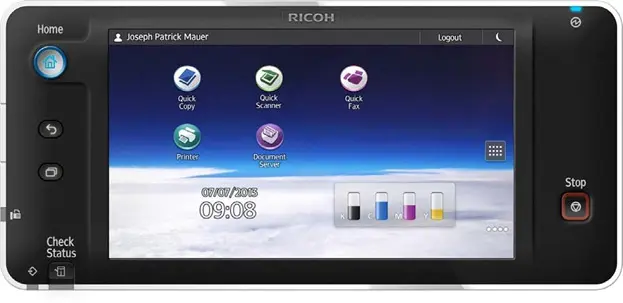
* Image of Smart Operation Panel
Ricoh Firmware Update Tool does not support the following Product/Model. Please contact your local Ricoh representative to obtain the updated firmware.
| Category | Product/Model | Firmware update availability schedule | Supported Firmware Version |
|---|---|---|---|
| Monochrome MFP | IM 2702 | Available | 1.21 |
| Production-Cutsheet | Pro C9200/C9210 | Available | 7.15 |
| Pro 8400S/8410S/8420S | Available | 1.06 | |
| Pro 8410/8420 | Available | 1.06 | |
| Pro 8300S/8310S/8320S | Available | 1.22 | |
| Pro 8310/8320 | Available | 1.22 | |
| Pro C7200S/C7210S/C7200SX/C7210SX | Available | 7.17 | |
| Pro C7200/C7210/C7200X/C7210X | Available | 7.18 | |
| Pro C5400S/C5410S | Available | 1.04 | |
| Pro C5400SL | Available | 1.04 | |
| Pro C5300S/C5310S | Available | 1.23 | |
| Pro C5300SL | Available | 1.18 | |
| Pro C5200S/C5210S | Available | 1.28 |
4. Important notes
- To send email using OAuth2.0 authentication, you must first update to a firmware version that supports OAuth2.0 authentication, then specify necessary settings from Web Image Monitor.
- To use OAuth2.0 authentication with the updated firmware, you must also specify an administrator email address. This email address will be used as the sender when sending email messages using the scanner function and when sending error notification emails. It will also be used as the "From" address for SMTP authentication when sending email.
5. Related information
- For information on how to configure printers and other devices to send email, please refer to the following information from Microsoft. The article also explains ways that you can send email without using SMTP authentication.
- For Microsoft's announcement on ending support for basic authentication for SMTP in Exchange Online, please refer to the link below.
- For Microsoft's announcement on the phase-out timeline for basic authentication for SMTP in Exchange Online, please refer to the link below.
6. Contact
Please contact your local Ricoh representative or dealer if you have any queries.
-
*Company and product names are trademarks or registered trademarks of their respective companies.
| About Ricoh |
Ricoh is a leading provider of integrated digital services and print and imaging solutions designed to support digital transformation of workplaces, workspaces and optimize business performance.
Headquartered in Tokyo, Ricoh's global operation reaches customers in approximately 200 countries and regions, supported by cultivated knowledge, technologies, and organizational capabilities nurtured over its 85-year history. In the financial year ended March 2025, Ricoh Group had worldwide sales of 2,527 billion yen (approx. 16.8 billion USD).
It is Ricoh's mission and vision to empower individuals to find Fulfillment through Work by understanding and transforming how people work so we can unleash their potential and creativity to realize a sustainable future.
For further information, please visit
###
© 2025 RICOH COMPANY, LTD. All rights reserved. All referenced product names are the trademarks of their respective companies.