
 Global

An app that provides enhanced support
for connecting smart devices and RICOH products.
RICOH Smart Device Connector
Free download here



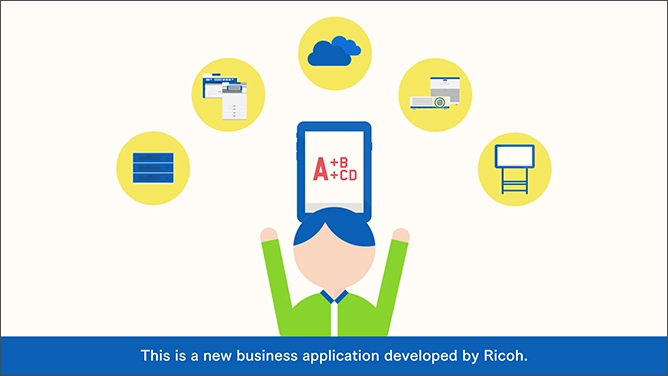
So how can you achieve the kind of next-generation work style you have come to expect from Ricoh? The answer is “RICOH Smart Device Connector.”
Smart devices are seeing greater and greater use on the business scene, but procedures for connection to office equipment are complex and still by no means stress free. With RICOH Smart Device Connector those complex procedures become simple, and you can seamlessly connect to various devices.
You can operate a multifunction product by just holding the smart device over it, and you can operate a projector or electronic whiteboard by just reading a QR code. The data made available via the connection of a smart device with other devices will support quick decision making and a high level of value creation. Get started immediately by just downloading a free app. Your everyday working environment will become a more creative place.
What's Smart Device Connector?
Free download here
Features
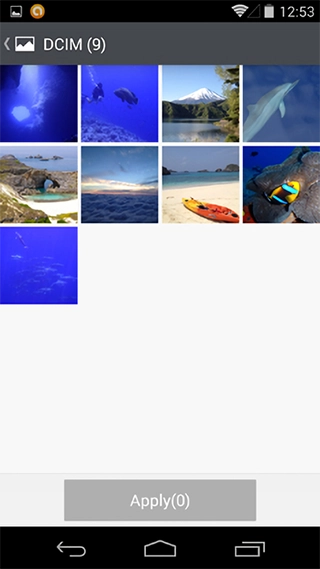
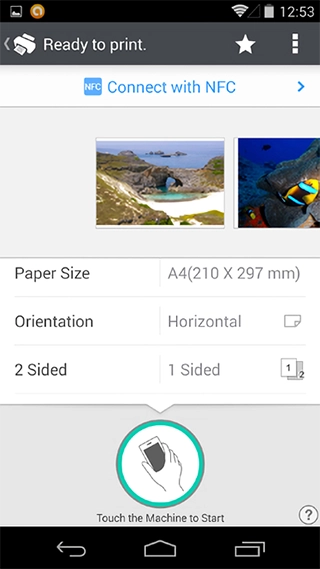
Print photographs and documents
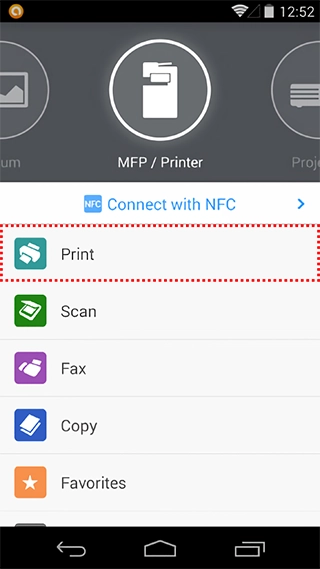
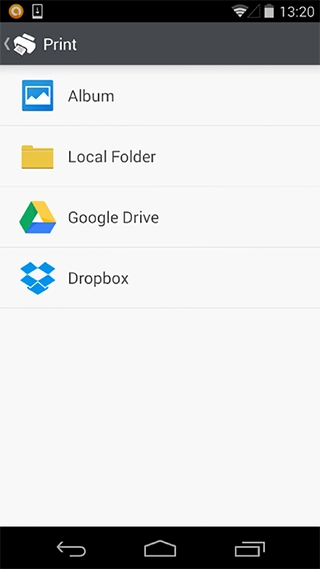
You can print photographs and documents stored on smart devices and in cloud storage.* This is convenient because the settings can be made with the smart device and the printing can be done directly by the multifunction product, all without using a PC. Use this capability when you want to hand out documents or photographs, and when characters are too small and difficult to see on your smartphone screen, by simply printing them out to get a better look.
In the same manner as when printing from a PC, you can specify number of copies, b/w or color, paper size, etc. In addition, the security features mean that you don't have to worry when printing confidential materials.
-
*To use the printing functions, it is necessary to install RICOH Smart Device Print&Scan (Android: version 2.3.7 or later, iOS: 2.3.10 or later).
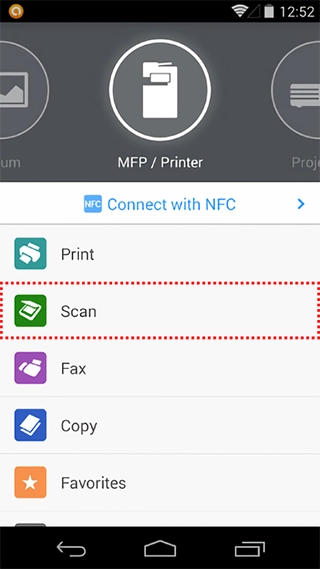
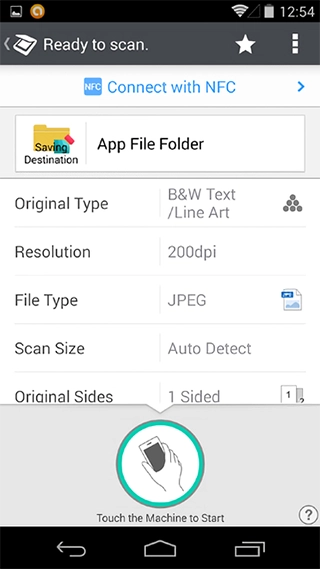
Scan materials and then save and transmit the data
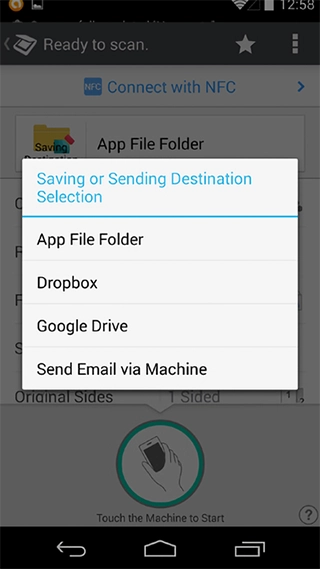
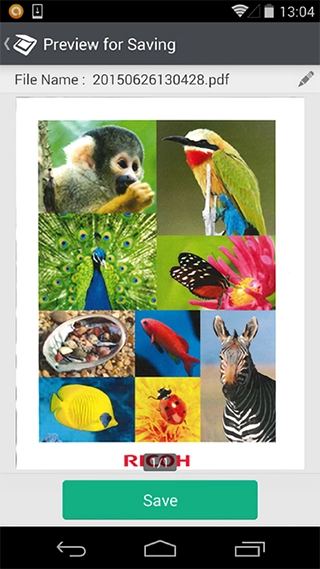
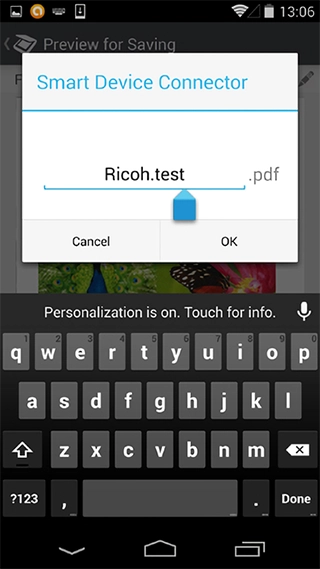
After scanning paper documents on a multifunction product, you can directly save the data on a smart device and in cloud storage so it can be viewed anytime and anywhere. Settings such as file format, resolution, and scanning size can be specified. In addition, it is also possible to send the scanned data (via the multifunction product*) to an email address designated in the smart device address book.
-
*It is necessary for the multifunction product to be connected to a network.
Make copies with operations performed on a smart device
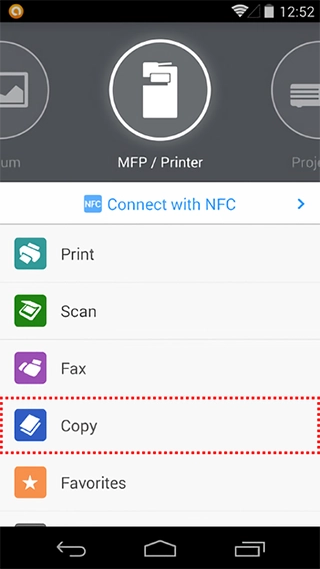
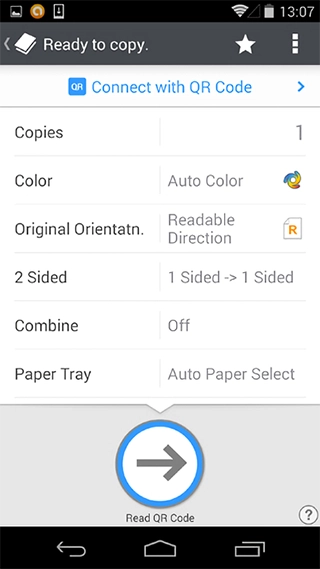
It is also possible to make copies by performing operations on a smart device. Copy settings (number of copies, b/w or color, simple or duplex, etc.) can be specified, and you can save frequently used settings as favorites.
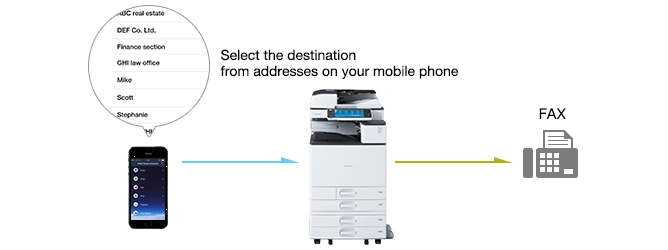
Send a fax from a smart device
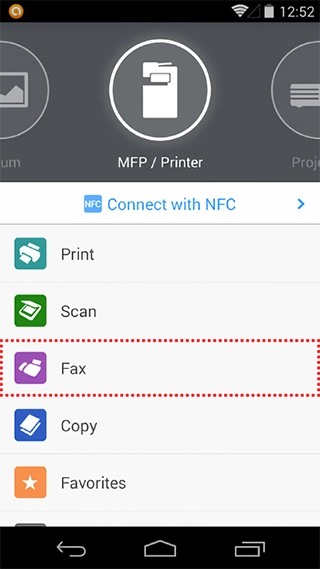
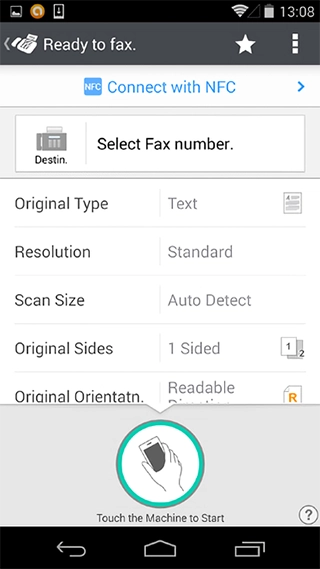
Specifying the settings on a smart device, faxes can be sent (via the multifunction product*) to fax numbers designated in the smart device address book. Settings such as document type, resolution, and paper size can be specified.
-
*It is necessary for the multifunction product to be connected to a fax line.
Project data to a big screen
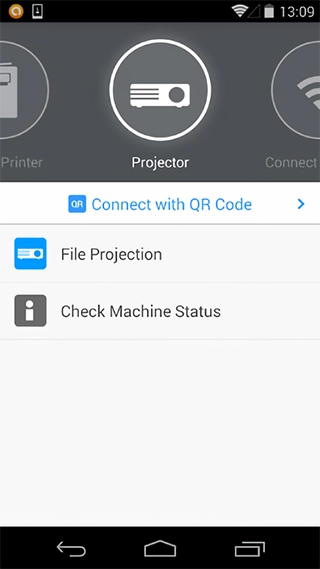
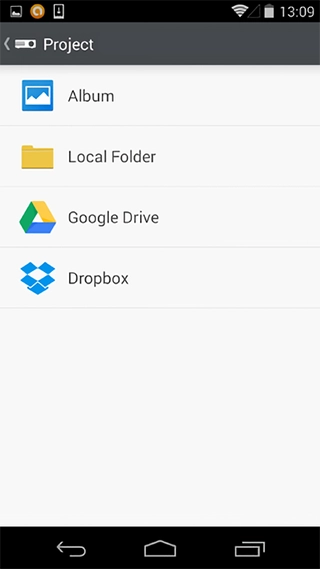
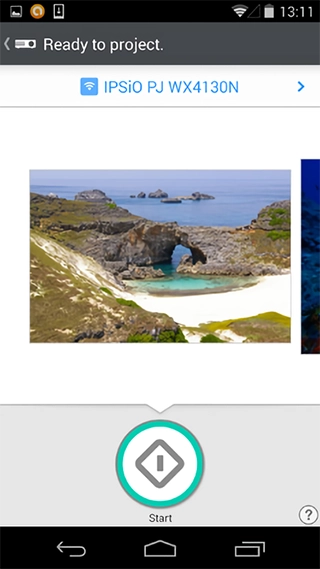
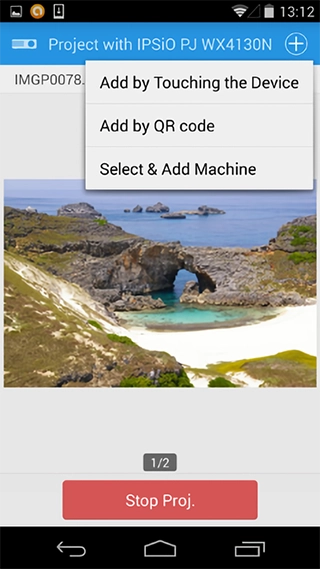
The data stored in a smart device and cloud storage can be projected to a bigger screen with File Projection function. It is also possible to project the data scanned from a multifunction product. Sharing paper documents in a meeting will be easier with this funciton.
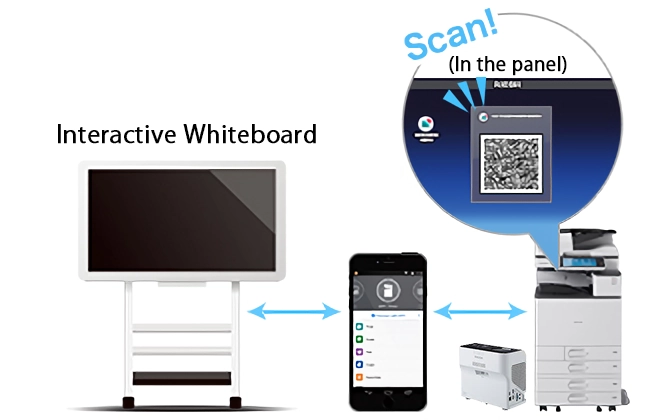
Access data and display it on the RICOH Interactive Whiteboard, and then capture data written on the whiteboard
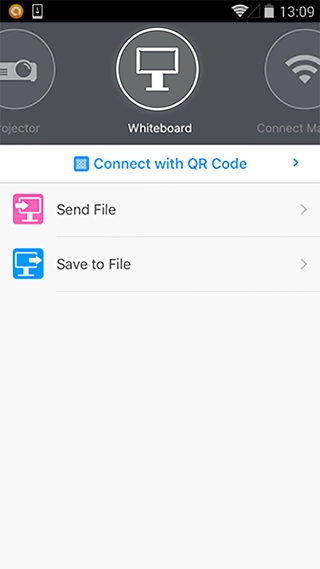
You can access data on devices and in cloud storage and display it on the RICOH Interactive Whiteboard. Of course, you can also handwrite discussion content on top of that data. When the meeting is over, you can upload the annotation data to the smart device or cloud to facilitate intelligent post-meeting follow-up.
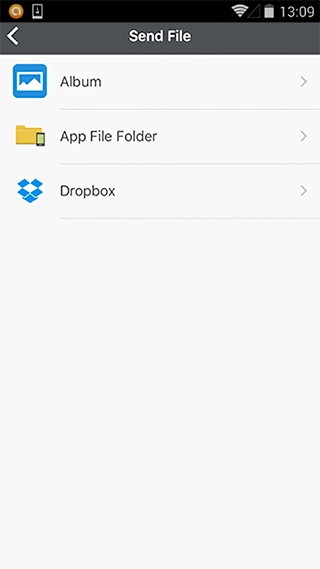
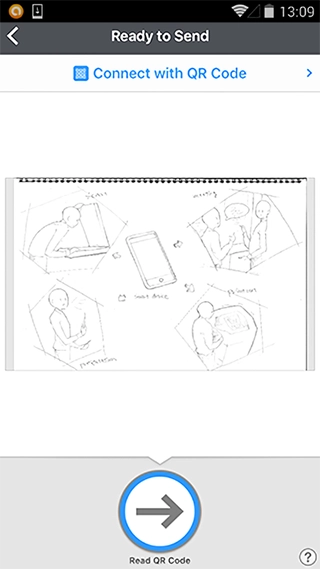
Easy connection possible using BLE*1
This is a wireless connection that makes it possible to reduce the burden of procedures for IP address/host name entry and QR code reading.
Supported models: Multifunction products*2
-
*1Bluetooth Low Energy
-
*2RICOH MP C306 and RICOH MP CW2201/CW1201 only.
-
*Print data and scan data are sent and received using Wi-Fi.
-
*When BLE is used, it is necessary to turn the smart device Bluetooth setting on.
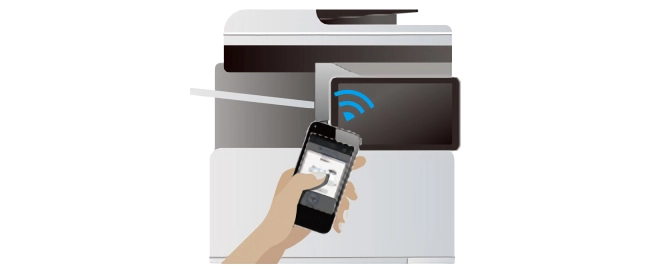
With an NFC-equipped Android device
Easy connection with just a touch
If you have an NFC-equipped Android device, by just touching the multifunction product, you can easily connect to it without having to perform any troublesome equipment registration in advance. Complete the connection by just touching the Android device on the NFC tag* attached to the multifunction product operation panel.
-
*A data write operation needs to be performed in advance by the device administrator.
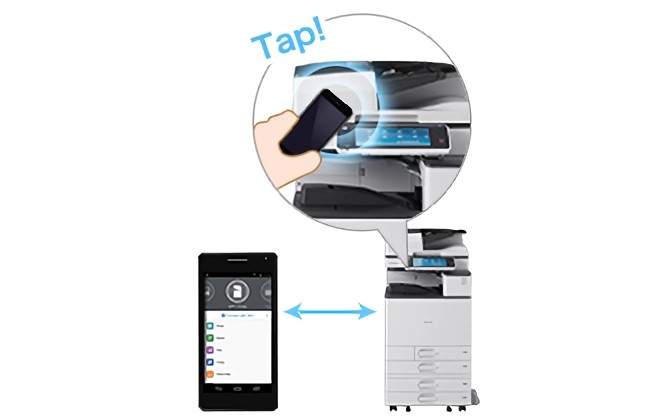
With an iPhone, iPad, Android
Connect by just scanning a QR code
By just scanning with your smart device the QR code displayed on the multifunction product operation panel, the screen, or Interactive Whiteboard, you can easily connect to it without having to perform any troublesome device registration in advance.
-
*There may be cases where the QR code does not display due to the security settings of the multifunction product. If that happens, please contact the administrator.
Address book information can be used
You can make direct use of information in your smart device address book. In the case of a scan, it is possible to send the scanned data (via the multifunction product*1) to an email address designated in the smart device address book. In addition, faxes can be sent (via the multifunction product*2) to fax numbers designated in the smart device address book. By putting to use information already stored in your smart device (contact list), you can utilize multifunction product in a smarter and more efficient manner.
-
*1It is necessary for the multifunction product to be connected to a network.
-
*2it is necessary for the multifucntion product to be conncected to a fax line.
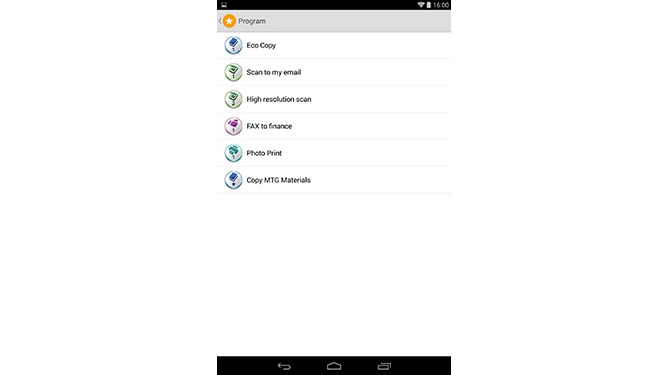
Carry personal function settings (favorites) anywhere in smart devices
Carry your personalized function settings with you by saving them on the smart device (Favorite function). Since the saved favorite can be easily activated, the effort required making setting changes each time is eliminated.
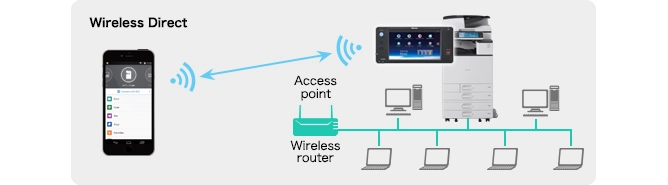
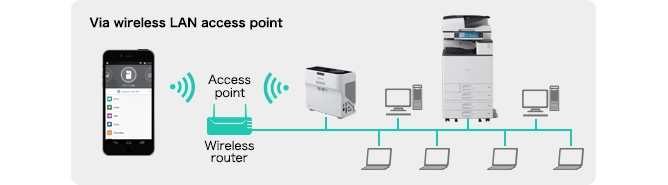
Using the Wireless Direct function on the "Smart Operation Panel", it is possible to transmit directly between a multifunction product and a smart device*. With this function, the smart device can be directly connected to the multifunction product without connecting to a network. It is also possible to select the method of connecting via a network accessed from an office wireless LAN access point.
-
*The availability of wireless direct function differs depending on countries and areas.
Copy
| Settings | Default | Available Settings |
|---|---|---|
| Color/Mono | Mono | Color, Mono, Auto Color |
| Orientation | Readable | Readable, Unreadable |
| 2-sided | 1 sided  1 sided 1 sided |
1 sided 1 sided, 1 sided Top to Top, Top to Top Top to Top, Top to Top Top to Bottom, Top to Bottom Top to Bottom, Top to Bottom Top to Top |
| Input Tray Setting | Auto Tray Select | Auto Tray Select, Tray 1, Tray 2, Tray 3, Tray 4 |
| Combine | Off | Off, Combine 2 pages, Combine 4 pages |
| Copies | 1 | 1-99 |
Scan
| Settings | Default | Available Settings |
|---|---|---|
| Address | Send to This Device | Send to This Device, Send to email via MFP |
| Color/Mono | B&W Text/Line Art | B&W Text/Line Art, Full Color Text/Photo |
| Resolution | 200dpi | 100dpi, 200dpi, 300dpi, 400dpi, 600dpi |
| File Format | JPEG | JPEG, PDF |
| Size | Auto | Auto, A3 SEF, B4 LEF, A4 LEF/SEF, B5 LEF/SEF, A5 LEF/SEF, 11" x 17" SEF, 8½" x 14" SEF, 8½" x 13" SEF, 8½" x 11 LEF/SEF, 5½" x 8½" LEF/SEF |
| Original Side | 1 sided | 1 sided, Top to Top, Top to Bottom |
| Orientation | Readable | Readable, Unreadable |
| Settings | Default | Available Settings |
|---|---|---|
| Copies | 1 | 1-99 |
| Color/Mono | Color | Color, Mono |
| Page Size | A4 | 11 x 17", 8½ x 14", 8½ x 11", 5½ x 8½", A3, B4, A4, B5, A5 |
| Orientation | Portrait | Portrait, Landscape |
| 2-sided | OFF | OFF, Open to left, Open to top |
| Staple | OFF | OFF, Top Left, Top Right, Top 2, Left 2, Right 2 |
| Combine | OFF | OFF, 2 in 1, 4 in 1 |
| Job Type | Normal Print | Normal Print, Locked Print |
| User ID | None | Up to 8 alphanumeric character |
| Password | None | 4-8 digit number |
Fax
| Settings | Default | Available Settings |
|---|---|---|
| Address | None |
ASCII numbers, *, #, - <iOS> -"," will be replaced by "-". -All characters that cannot be used in Ricoh Fax will be removed. |
| Original Type | Text | Text, Text/Line Art, Text/Photo, Photo |
| Resolution | Standard | Standard, Detail |
| Size | Auto | Auto, A3 SEF, B4 LEF, A4 LEF/SEF, 11" x 17" SEF, 8½" x 14" SEF, 8½" x 11 LEF/SEF |
| Original Sides | 1 sided | 1 sided, Top to Top, Top to Bottom |
| Orientation | Readable | Readable, Unreadable |
| Density Control | Auto | Off, 6 levels of manual density control |
Specifications
| iOS Version | Android Version | |||
|---|---|---|---|---|
| General | OS and versions supported | iOS 18 and iOS 26 | Android™ 12 and later | |
| Screen orientation supported |
iPad: Vertical, horizontal iPhone: Vertical |
Android: Vertical | ||
| Languages supported*1 |
Languages supported*1 Japanese, English, Spanish, Portuguese, French, German, Italian, Chinese (Simplified, Traditional), Dutch, Russian, Korean, Thai, Vietnamese, Brazilian Portuguese, Swedish, Danish, Norwegian, Czech, Hungarian, Turkish, Polish, Finnish, Catalan, Greek, Hebrew*2, Arabic*2 |
|||
| Wi-Fi™ connection | Supported | |||
| Wireless Direct*3 connection | Supported | |||
| Printer/scanner/projector/Interactive Whiteboard registration | Bluetooth*4 | Supported | ||
| QR code*5 | Supported | |||
| Search for devices on same subnet*6 | Supported | |||
| IP address/host name/LF server*7 designation | Supported | |||
| Printing/scanning/projection with direct connection to storage (cloud, etc.) | Cloud storage service | Supported (Google Drive*8, Dropbox*8, Box*8, One Drive*8) | ||
| Authentication | Multifunction product login (basic authentication) | Supported | ||
| Functions | Print function | Settings | Print copies, color/B&W, paper size, 2-sided, staple, combine, print quality, print page designation*9, job type, print user ID, locked print password | |
| Content (document, photograph) |
|
|
||
| Links with other apps*10 | Supported (OpenIn: jpg, jpeg, png, tiff, tif, bmp, gif, pdf) | Supported (Intent: jpg, jpeg, png, pdf) | ||
| Scan function | Settings | Saving location/destination, color/B&W, resolution, file type, read size, original sides, original orientation | ||
| File type |
|
|||
| Links with other apps*10 | Supported (OpenIn) | Supported (Intent) | ||
| Fax function*11 | Settings | Destination, original type, resolution, original size, original sides, original orientation, manual density control, auto density control | ||
| Copy function | Settings | Copies, color/B&W, original orientation, 2-sided, combine, paper tray | ||
| Projector projection | File projection*12 | Supported | ||
| Check status of device | Supported | |||
| RICOH Interactive Whiteboard | Send file | Supported | ||
| Save file | Supported | |||
| Other functions | Navigation display items | Supported | ||
| Pass code settings | Supported | |||
| QR code print*13 | Supported | |||
| Bluetooth® Sensitivity Settings | Supported | |||
-
*1If the smart device is set to display a language other than those shown, English will be used.
-
*2In the case of languages that use right-justified text, there are places where the display text is not right justified.
-
*3Only models with Smart Operation Panel. Also, when using a Wireless Direct connection, device registration cannot be done on the app. Projectors and RICOH Interactive Whiteboard are not supported.
-
*4Device connection using Bluetooth® can only be done by models with Bluetooth® functions. Projectors and RICOH Interactive Whiteboard are not supported. The smart device must be a terminal and have an OS with Bluetooth® Ver. 4.0 or later.
-
*5Please see the Models supported.
-
*6For the search for devices on the same subnet, the device and the smart device need to be connected to the network on the same subnet mask.RICOH Interactive Whiteboard is not supported.
-
*7The LF servers are: Ricoh LF print server AE2 and Windows® shared print queue. Windows® shared print queue cannot be resident together with the domain controller. Bluetooth and QR codes cannot be used for output after print data is sent to the LF server.
-
*8A separate cloud storage service contract is necessary.
-
*9PDF files only.
-
*10Depending on the app, there may be cases where a link is not possible.
-
*11There are cases where the connecting device needs to have an option for fax use. Paper document fax transmission only.
-
*12Video projection is not possible.
-
*13QR codes can only be printed on printers that support this app.
-
*The models supported for output from the supported software correspond to the models supported by the individual software product. Please reference the site of the individual software product.
-
*Among Android devices, those that cannot download and install software from GooglePlay cannot be used.
-
*Cable connection from a smart device is not supported.
-
*Some functions require the latest version of the software.
Models supported
Connection methods
| Supported connection methods | |||||
|---|---|---|---|---|---|
| Color Multifunction Products | Bluetooth® | QR Code | NFC | Search for devices on same subnet | Specify IP address/Host name |
|
No | No | No | Yes | Yes |
| Aficio MP C6501/C7501 | No | No | No | Yes | Yes |
|
No | No | No | Yes | Yes |
|
No | No | No | Yes | Yes |
|
No | No | No | Yes | Yes |
|
No | No | Yes | Yes | Yes |
|
No | Yes | Yes | Yes | Yes |
|
Yes | Yes | Yes | Yes | Yes |
|
Yes | Yes | No | Yes | Yes |
| Supported connection methods | |||||
|---|---|---|---|---|---|
| Monochrome Multifunction Products | Bluetooth® | QR Code | NFC | Search for devices on same subnet | Specify IP address/Host name |
|
No | No | No | Yes | Yes |
|
No | No | No | Yes | Yes |
|
No | No | No | Yes | Yes |
|
No | No | No | Yes | Yes |
|
No | No | No | Yes | Yes |
| SP 3600SF/3610SF | No | Yes | Yes | Yes | Yes |
| MP 2553/3053/3353 | No | No | No | Yes | Yes |
|
No | No | No | Yes | Yes |
| IM 2702 | No | Yes | No | Yes | Yes |
|
No | No | Yes | No | No |
|
No | Yes | Yes | Yes | Yes |
|
Yes | Yes | Yes | Yes | Yes |
| IM 2510/2510A/3010/3010A/3510/3510A/4510/5510/6010/7010 | Yes | Yes | No | Yes | Yes |
| Supported connection methods | |||||
|---|---|---|---|---|---|
| Color Printers | Bluetooth® | QR Code | NFC | Search for devices on same subnet | Specify IP address/Host name |
|
No | No | No | Yes | Yes |
|
No | No | No | Yes | Yes |
|
No | No | Yes | Yes | Yes |
| C125 P | No | Yes | Yes | Yes | Yes |
| SP C840DN/C842DN | Yes | Yes | Yes | Yes | Yes |
| IP C8500 | Yes | Yes | No | Yes | Yes |
| Supported connection methods | |||||
|---|---|---|---|---|---|
| Monochrome Printers | Bluetooth® | QR Code | NFC | Search for devices on same subnet | Specify IP address/Host name |
|
No | No | No | Yes | Yes |
|
No | No | No | Yes | Yes |
|
No | No | Yes | Yes | Yes |
| 132 P | No | Yes | Yes | Yes | Yes |
| Supported connection methods | |||||
|---|---|---|---|---|---|
| Geljets | Bluetooth® | QR Code | NFC | Search for devices on same subnet | Specify IP address/Host name |
|
No | No | No | Yes | Yes |
| Supported connection methods | |||||
|---|---|---|---|---|---|
| Wide Format Multifunction Products | Bluetooth® | QR Code | NFC | Search for devices on same subnet | Specify IP address/Host name |
| Aficio MP W2401/W3601 | No | No | No | Yes | Yes |
| MP CW2200 | No | No | No | Yes | Yes |
|
Yes | Yes | Yes | Yes | Yes |
| Supported connection methods | |||||
|---|---|---|---|---|---|
| Production-Cutsheet | Bluetooth® | QR Code | NFC | Search for devices on same subnet | Specify IP address/Host name |
| Pro C5100S/C5110S | No | No | No | Yes | Yes |
|
Yes | Yes | Yes | Yes | Yes |
| Pro C5400S/C5410S | Yes | Yes | No | Yes | Yes |
| Supported connection methods | |||||
|---|---|---|---|---|---|
| Interactive Whiteboards | Bluetooth® | QR Code | NFC | Search for devices on same subnet | Specify IP address/Host name |
| IWB D5500/D5510/ Controller Type1/Controller Type2 | No | Yes | Yes | No | Yes |
| Supported connection methods | |||||
|---|---|---|---|---|---|
| Projectors | Bluetooth® | QR Code | NFC | Search for devices on same subnet | Specify IP address/Host name |
| PJ WX4152NI/WX4152N/WX4241N/WX3351/X3351 | No | Yes | Yes | Yes | Yes |
| PJ WX4141NI/WX4141N | No | No | Yes | Yes | Yes |
-
*Near Field Communication (NFC) compatible
Features
| Supported features | |||||||
|---|---|---|---|---|---|---|---|
| Color Multifunction Products | Scan | Copy | Fax | File Projection | Send file | Save file | |
|
Yes | No | No | No | No | No | No |
| Aficio MP C6501/C7501 | Yes | No | No | No | No | No | No |
|
Yes | No | No | No | No | No | No |
|
Yes | No | No | No | No | No | No |
|
Yes | Yes | Yes | Yes | No | No | No |
| MP C2003Z/C2503Z/C3003Z/C3503Z/C4503Z/C6003Z (with Smart Operation Panel) | Yes | Yes | Yes | Yes | No | No | No |
|
Yes | Yes | Yes | Yes | No | No | No |
| Supported features | |||||||
|---|---|---|---|---|---|---|---|
| Monochrome Multifunction Products | Scan | Copy | Fax | File Projection | Send file | Save file | |
|
Yes | No | No | No | No | No | No |
|
Yes | No | No | No | No | No | No |
|
Yes | No | No | No | No | No | No |
|
Yes | No | No | No | No | No | No |
|
Yes | No | No | No | No | No | No |
| SP 3600SF/3610SF | Yes | Yes | Yes | Yes | No | No | No |
| MP 2553/3053/3353 | Yes | Yes | Yes | Yes | No | No | No |
| MP 2554/3054/3554/4054/5054/6054 | Yes | Yes | Yes | Yes | No | No | No |
|
Yes | Yes | Yes | Yes | No | No | No |
| Supported features | |||||||
|---|---|---|---|---|---|---|---|
| Color Printers | Scan | Copy | Fax | File Projection | Send file | Save file | |
|
Yes | No | No | No | No | No | No |
|
Yes | No | No | No | No | No | No |
|
Yes | No | No | No | No | No | No |
| Supported features | |||||||
|---|---|---|---|---|---|---|---|
| Monochrome Printers | Scan | Copy | Fax | File Projection | Send file | Save file | |
|
Yes | No | No | No | No | No | No |
|
Yes | No | No | No | No | No | No |
| Supported features | |||||||
|---|---|---|---|---|---|---|---|
| Geljets | Scan | Copy | Fax | File Projection | Send file | Save file | |
|
Yes | No | No | No | No | No | No |
| Supported features | |||||||
|---|---|---|---|---|---|---|---|
| Wide Format Multifunction Products | Scan | Copy | Fax | File Projection | Send file | Save file | |
| Aficio MP W2401/W3601 | Yes | No | No | No | No | No | No |
| MP CW2200 | Yes | No | No | No | No | No | No |
|
Yes | Yes | Yes | Yes | No | No | No |
| Supported features | |||||||
|---|---|---|---|---|---|---|---|
| Production-Cutsheet | Scan | Copy | Fax | File Projection | Send file | Save file | |
|
Yes | No | No | No | No | No | No |
|
Yes | Yes | Yes | Yes | No | No | No |
| Supported features | |||||||
|---|---|---|---|---|---|---|---|
| Interactive Whiteboards | Scan | Copy | Fax | File Projection | Send file | Save file | |
| IWB D8400/D6500/D5510/D5500 | No | No | No | No | No | Yes | Yes |
| Supported features | |||||||
|---|---|---|---|---|---|---|---|
| Projectors | Scan | Copy | Fax | File Projection | Send file | Save file | |
| PJ WX4152NI/WX4152N/WX4241N/WX3351/X3351 | No | No | No | No | Yes | No | No |
| PJ WX4141NI/WX4141N | No | No | No | No | Yes | No | No |
-
*Near Field Communication (NFC) compatible
RICOH Smart Device Connector App is free and it can be downloaded from the following locations
RICOH Smart Device Connector App for iPhone
Download directly from the App Store using your iPhone or iPad device.
-
*iTunes installation is necessary.


RICOH Smart Device Connector App for Android based devices
Download directly from the Apps section on the Google Play™.

-
*Apple, the Apple logo, iPhone, and iPod touch are registered trademarks of Apple Inc. in the United States and other countries. iPad is a trademark of Apple Inc.
-
*Google, the Google logo, Android, the Android logo, Google Play, and the Google Play logo are the trademarks or registered trademarks of Google Inc.
-
*Other company names and product names are, as a general rule, the trademarks or registered trademarks of their respective companies.
